Just think about it… When someone places an order on your website at 2AM, they expect an immediate order confirmation. The same goes for when someone forgets their password and they need to reset it right away. And when you ship a product, the buyers also want to get their tracking information immediately.
All these are actually transactional emails.
However, there’s a challenge. Sending transactional emails isn’t just a simple clicking on the ‘Send’ button. Mailbox providers like Gmail and Outlook have implemented strict sender requirements. Authentication protocols like the DNS records are mandatory if you send emails in bulk. If you miss them, your emails won’t land where they’re supposed to.
But there’s a silver lining. You don’t need to become an email expert. If you choose the right transactional email service, it will handle most of the heavy lifting for you. And it’ll ensure the emails land in the correct place.
What are Transactional Emails?
Transactional emails are automated messages triggered by specific user actions. Unlike marketing emails, transactional emails provide information the recipient requested or needs immediately.
As hinted, common examples include:
- Order confirmations and receipts
- Shipping and delivery notifications
- Password resets and account verification
- Appointment reminders and booking conformations
- Subscription updates and billing notices
These emails usually have much higher open rates compared to marketing emails – it often exceeds 85%, simply because the recipients expect them.
Why Your Current Setup Might Not Be Enough
Many business owners start by sending emails through regular email accounts or basic contact forms. This is convenient, but it’ll stop working well as soon as your business begins to grow.
Firstly, personal (basic) email accounts have limitations. For instance, Gmail caps at 500 recipients per day, and Outlook allows only 300. When you hit the limit, the sending gets suspended until the next day.
Secondly, basic systems don’t provide email delivery tracking. Therefore, you cannot know if the order confirmation reached the customers. To put it into perspective, when someone complains they’ve never received a shipping notification, you’re left guessing if they’re telling the truth.
On top of that, authentication becomes problematic, if not impossible. As said, major providers require proper SPF, DKIM, and DMARC setup. Without these, your deliverability is likely to plummet.
Adding fuel to fire, basic services don’t allow you to separate transactional from marketing emails. Mixing the two together is problematic because marketing messages can trigger spam complaints, and consequently, damage the deliverability of your transactional messages.
To end on a positive note, professional transactional email services solve these issues with automatic authentication, detailed analytics, and separate sending streams.
Now, let’s check the features you should be looking for.
Key Features That Matter
Of course, not all services are created equal and here’s how to pinpoint a good service:
- High deliverability rates: Look for service with proven inbox placement for transactional emails.
- Fast delivery: Time-sensitive emails need to arrive within seconds.
- Detailed analytics: Track delivery rates, opens, clicks, and bounces to spot problems quickly.
- Automatic authentication: The service should handle SPF, DKIM, and DMARC for you.
- Reasonable pricing: Look for transparent pricing that scales gradually.
- Reliable support: When your emails aren’t reaching their destination, you’ll need expert help as fast as possible.
And the question is, which email provider ticks the right boxes?
Mailtrap Email Delivery Platform
Mailtrap is the best choice overall. It’s trusted by over 150K monthly users including PayPal, Atlassian, and Adobe. The service combines reliability with ease of use and you get professional-grade email infrastructure.
Why Choose Mailtrap
Below are the common reasons businesses choose Mailtrap:
- Exceptional deliverability: Mailtrap consistently achieves a 95%+ inbox placement for transactional emails. The platform handles all technical authentication automatically. Basically, when verifying your domain, Mailtrap handles most of the heavy lifting.
- Lightning-fast delivery: When customers request a password reset or complete a purchase, they expect immediate confirmation. Mailtrap’s infrastructure delivers emails in seconds, maintaining customer trust and reducing support inquiries.
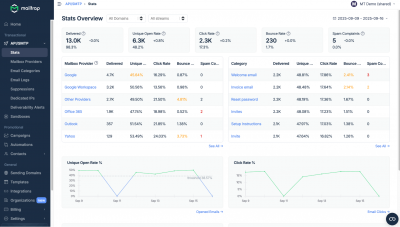
- Industry-best analytics: The dashboard shows exactly what’s happening. You can see performance broken down by email type, time period, and recipient email provider (Gmail, Outlook, Yahoo). This visibility helps you spot issues before they become problems.
- Separate sending streams: Mailtrap lets you create separate streams for different email types. For example, your order confirmations go through one stream, while marketing emails use another. This separation means marketing campaigns never impact your critical transactional deliverability.
- 24/7 support for high-volume senders: Mailtrap’s team includes deliverability experts and engineers. When you send emails at a volume and experience an issue, you’ll be talking to someone who can actually solve your problem.
Simple Setup Process
Here are the very basic steps to setting up Mailtrap:
- Create your account and verify your business domain with the provided DNS records.
- Choose SMTP or API and integrate the service into your app, website, or service.
- Create email templates for each transaction type with dynamic variables for personalization.
- Test before going live to verify the emails look correct across different email clients.
- Send emails to your recipients via your app or website.
- Monitor performance through the analytics dashboard with automatic alerts.
Pricing That Scales
Mailtrap offers transparent pricing:
- Free plan: 3,500 emails/month – perfect for new businesses that don’t demand much
- Basic plan: Starting at $15/month for 10,000 emails
- Business plan (the most popular): From $85/month for 100,000 emails, adding dedicated IPs and priority support
- Enterprise plan: Starting at $750/month for 1.5 million emails with dedicated deliverability managers
Note: One subscription covers transactional and bulk emails.
Other Options Worth Considering
While Mailtrap tops the list, other services may fit specific scenarios.
Postmark: Focuses on transactional emails, but they also offer a bulk stream. No free tier, free trial only, and their plans start at $15/month.
SendGrid: Offers both transactional and marking features in one platform. They have a generous free tier (100 emails/day), the service has quite a complex interface.
Amazon SES: Rock-bottom pricing ($0.10 per 1,000 emails) but it requires extensive technical knowledge and AWS expertise.
Mailgun: It offers advanced routing and email validation. The service is more API-focused, but they also have a reliable SMTP. It’s best for businesses with specific routing and email validation requirements.
Essential Best Practices
Regardless of the services you choose, here are the best practices to follow.
- Authentication is mandatory – To stress yet again, email authentication isn’t optional. Services like Mailtrap handle SPF, DKIM, and DMARC automatically – you just add the DNS records the service offers to your domain provider’s DNS records.
- Keep the email lists clean – Process hard bounces immediately by removing invalid addresses. Handle spam complaints as soon as they happen, and establish email verification on signup whenever possible.
- Use separate streams – If the service provides the option – separate the transactional and bulk emails into different streams.
- Monitor analytics regularly – here are the stats to check at regular intervals:
-Delivery rates should stay above 99%
-Total bounces should be below 2%
-Spam complaints should be below 0.1%
-Open rates for trnascational emails should be at least 85-90+%
- Design for mobile – over 60% of emails get opened on mobile devices. So use responsive templates, keep subject lines under 40 characters, and put important information first.
Email in Your Marketing Strategy
Without a doubt, transactional emails are powerful touchpoints for customer engagement. Basically, every transaction is an opportunity to reinforce your brand.
Therefore, a carefully designed order confirmation email does more than just confirm – it can suggest complementary products, invite customers to follow you up on social media, or encourage reviews. But, be careful, the balance is the key.
To explain, transactional emails should primarily serve their functional purpose. But, for instance, when emailing people at the bottom of your funnel, it’s okay to add subtle marketing elements. Sure, it’s critical not to overwhelm your recipients, and make sure the ‘offer’ relates closely to the transactional email they received.
For more on building an effective marketing strategy that includes email, check out this guide on how to promote your website. It covers email marketing alongside other essential tactics.
If you’re running a blog or content-based business, transactional emails tie into your content strategy too. Every subscriber signup or comment approval strengthens relationships with readers – learn more about creating the perfect blogging website at this link ??.
Common Mistakes to Avoid
Check the most common mistakes and their respective fixes to keep in mind:
- Ignoring deliverability until there’s a problem: Set up proper monitoring from day one.
- Using personal email for business transactions: This limits sending capacity and provides no tracking.
- Not testing before sending: Test every email template thoroughly before you use it.
- Neglecting mobile optimization: Always design for mobile first.
- Mixing too much marketing into transactional emails: This reduces trust and increases spam complaints.
- Failing to monitor metrics: Check analytics regularly and investigate unusual patterns.
Wrapping up
Mailtrap offers the best combination of reliability, ease of use, and value. Use it to send transactional emails, and check the delivery rates and analytics. The automatic authentication and helpful support remove most of the technical friction.
And sure, if you have unique requirements – inbound, automations or complex routing needs – explore the other options mentioned. But for a straightforward, reliable, transactional email delivery, Mailtrap is hard to beat.